


This program will Import Invoices into Sage 50. It can Import & Export Customer Sales Invoices, Credit Notes, Quotes & Proforma’s to and from the Sage 50 Invoices and Credits Module from a CSV file. This is our joint most popular selling Add-On Tool!
Core Features of Adept Sage 50 Sales Invoice CSV Add-On
- Can be used to import data into any field in the Sage 50 Invoice file that is exposed by the Sage SDO.
- The column headings in the first line of the CSV file are used to define the fields that the data should be imported into.
- Will import Excel style multi line data into the Service Text field.
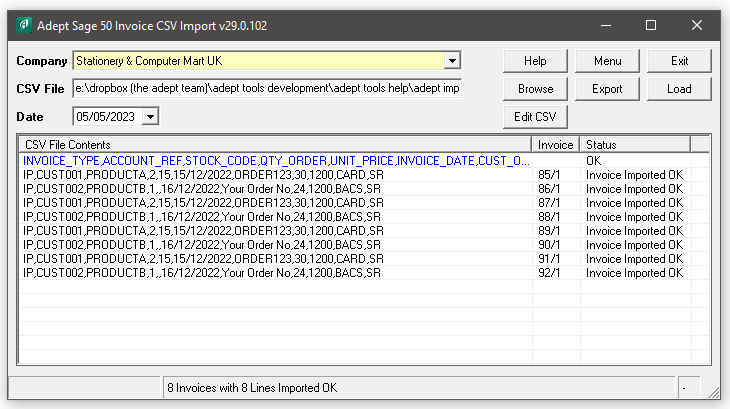
- The CSV file contents are displayed, along with any error messages, before the import takes place.
- Create new template CSV files by selecting fields from a list of available field names.
- Select a delivery address from the customer’s list of delivery addresses by entering its description in a DELIVERY_DESCRIPTION column.

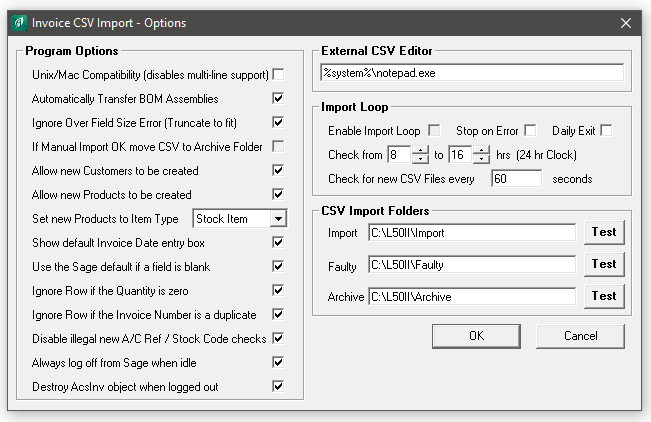
- Optionally move the CSV file to an Archive folder after it has been successfully imported.
- Optionally monitor a specified folder for new CSV files and import them automatically.
- Option to be run from the command line with -F
- Optionally create new Customer or Product records if they don’t exist.
- Export option will load your CSV template with data from your current Invoice file.
- This program can only be used for importing Sales Invoices, Credit Notes, Quotes & Proforma’s. If you need to import Supplier Invoices you should use our program called the Adept Sage 50 Transaction CSV which is sold seperately.
- This Add-On creates new Sales Invoices, Credits, Quotes & Proforma’s, it cannot add item lines to existing ones.
- In a multi company Sage environment the company that each invoice should be loaded into can be specified in the CSV file.
- You do not have to log other users out of Sage while using this Add-On Tool.
- The program can be run from an icon in the Sage Invoice module tool bar (dependant on Sage version).
Add-On Pricing & Compatibility
- Only £200.00 + VAT for a company wide licence plus 25% Annual Renewal Fees.
- Adept Add-Ons are Multi User at no extra cost.
- Compatible with the UK Edition of Sage 50 & 50cloud Accounts versions 8 to 34.
- Unless otherwise stated, also works with any minor version numbers such as v32.1 or v33.1
- Adept Add-Ons are backwards compatible when it comes to Sage versions, most go back to v8
- Web Update facility to keep your program up to date, accessed via Menu>About.
- Thirty day Free Trial available.
- The trial version is limited to a 10 Row CSV file per import.
- Download example CSV Templates by clicking on this link.
Sales Invoice CSV in Action
Sales Invoice CSV Options
Import Invoices into Sage 50

How much does it cost?

Initial Upfront cost Covering your first 12 Months software use

Adept Tools
Add-Ons & Apps for
Sage 50 Accounts

25% Annual Renewal Fee for Continuous use in Year 2 onwards
Customer Testimonials for our range of CSV Tools
All working well, tool set from your guys really helpful – thanks for that.

Just wanted to say, I’ve put off buying your import tools for way too long and now I have, I’m kicking myself that I didn’t make the jump sooner!
Thanks for an excellent product and support, much appreciated.
That worked great – the Price CSV export and import worked 100% 3310 items updated in less than 30seconds!
Thank you. I still think this software is magic.
Thanks again. I’d like to say how valuable your tools have been for us – they are excellent.
Thank you! Another great tool you have made.
Many thanks Martin. Your software turned out to be the perfect solution for our requirements and a total life saver. Still stunned by the abject lack of inclusion of this facility from Sage themselves, but more than happy to fully support this exquisite piece of work.
I’m sure I’ve said before, but this software has been an absolute godsend for us. We’re now using it to import invoices from 2 companies instead of just the one before (by using the SAGE_PATH field). Best Regards.
Thanks for getting back to me so quickly. Turning it on and off again worked – so thank you! Enjoy the rest of your week.
Many thanks for all your help with using this add on. This has worked well for us and we are considering using it regularly in order to make use of the BOM transfer.
Danny, Thank you for clarifying the below, it was of great help! Thanks again.
The sales order tool has revolutionised the way this site works.
Just some very quick feedback for you. I have today started using your invoice import tool and it majorly reduced the time taken to run our monthly renewal invoices. Worth every penny and so easy to use!
If Adept ever need a testimonial , please free to quote me as a very very satisfied customer!
I am impressed, at the ease of the import and how quickly I’ve got up to speed with it! Thanks once again for your support.

I have been using your import sales order add on for Sage and it has totally transformed our business and I just want to say thank you for that.
Many thanks for your Danny – this is all working great now and I can confirm that we will now purchase a full licence.
Thank you so much for this. As with all your products it was very intuitive and worked like a dream. I will definitely be recommending you to all Sage 50 customers – so impressed!
Thank you Danny. It all makes sense now. We have also removed the price field so it is quite a clever little tool. It takes very little time to do and solves our problem.
We’re busy working with new and existing clients installing our new RouteMagic system using Adept CSV Tools. We’re getting lots of appreciative comments regarding the Adept Tools and it’s certainly been really helpful for us.
I would like you to know how useful your import programs have been in getting our data into Sage and without corruption.. all reporting ‘No Errors in Data’, Thank you again.
I would just like to pass on my thanks for providing the CSV Import software. After using the trial to make the appropriate adjustments to our system (that tested successfully), we purchased the full version. It is a fantastic piece of software that is going to save us a lot of time from now on.
Thanks for the help we have both Header Only and Line Item Invoices now going into Sage 50 correctly.
Many thanks for the invoice and also the rapid re-activation following the annual renewal. For the record; this software remains one of the most useful, functional and convenient packages that I have ever had the pleasure of dealing with. It is used on a daily basis and performs flawlessly and is invaluable for our Finance Team and their Sage50 interactions. The Annual Renewal Fee seems obscenely cheap and I can only commend and thank everyone involved at Adept Computer Support for this exquisite contribution, filling in the abyss left by Sage on such a crucial and intrinsic part of bulk batch ledger transaction posting.
Thanks, I’ll check it out, I’ll be buying it. Regards.
We just ran another through, and it was perfectly happy! By the way, your software rocks!
Many thanks for your assistance with the Invoice CSV Tool, Once up and running- it is SO simple!
Adept Sales Invoice CSV is quite possibly the most useful software I’ve ever used – love it! Thanks for all your help.
Worth mentioning about the Sales Order CSV – it is a brilliantly simple timesaving program!!!
Updated my testing today to include setting up of the customer record, the invoice & the receipt/payment from the customer – who knew all this was possible! Thank you for helping me achieve the efficiencies our business needs.
I have just purchased Purchase Order CSV Tool and it is fantastic.
I am going to buy the Transaction CSV now that I have it installed. Its stunning in it’s flexibility.
I’ve been using your Sage CSV import product for many years across many clients and LOVE it.
I just wanted to say thank you for all your help getting us started, it’s appreciated. We have purchased the Add-On Tool and I managed to allocate 5000 invoices to a Payment on account in our test data using Transaction CSV! Which was brilliant ? I’m now looking forward to using it on our live data, it will save a lot of time!
Thanks Danny, Love the videos and the product is great too!! Cheers, Best regards.
Imported 30k line items over the weekend without a hitch using Price CSV, so happy with the Add on.
We recently purchased Sage 50 Sales Invoice CSV and it really has revolutionised our invoicing procedure going forward, and saved our accounts team a whole lot of time, thanks.
I’ve had a client using the Import Transaction tool and they love it!
Brilliant. Thanks for all your help. Best wishes.
Hello, Great product and great renewal price and service!
Thanks Danny, completely comprehensive, I would expect no less from you, thanks for your help as always!
My apologies, I forgot to thank you for making the changes to the software on the S1 lines. This works perfectly now and we have made the purchase. It is an excellent addition for our business.
Thank you to all at Adept – the programs have made my life so much easier when it comes to managing our BOMs/Data.
We recently purchased you sales order csv importer and it is has really been a life saver at our company.
Loving the Product CSV software, it’s very easy to use.
The software is fantastic by the way; it’s completely changing the way we work and is saving many man hours, whilst also increasing accuracy.
Thanks, we will make it work using the carriage charge. Thanks again for the top advice!
As a company we have been using Sage50 since 2007. Close on 14 years of data entry with no set rules, a growing business with different people involved. Anyone in this position will be able to relate to the mess of data this led to. One of our problems was finding quickly the right delivery address- some customer account references with 100’s of addresses. This was sometimes ‘patched’ by creating yet another address- making the problem grow. To fix everything manually within Sage was simply not an option and no export function exists. We had to find a solution. The Adept customer address Import/Export function did exactly what we wanted and thanks to Danny for his patience in helping to oversee the first data export and import. As a business owner this addon will bring such an improvement to our sales order processing- and un-doubtabley lead to further improvements.
I bought the tool in the end and it’s working great for us. I created a CSV output from our CRM and the two play together nicely – so impressed! Thanks buddy.
I would just like to say you’re Sage Sales Invoice CSV import is amazing and has helped our company out so much over the last couple of years.
Danny, You are not just a pretty face. I looked at it in Notepad and it shows apostrophes on the last two lines. Thanks for that, tool is working great!
Superb! Thanks Danny, will try that tomorrow.
Brilliant thanks Danny sorry I knew it was in the documentation somewhere!
Just tested the program, I can’t believe how simple and effective it is. ADEPT Rocks!
Danny – Thanks for your help today, You are the Best, as are the Tools!
It’s Andy here, I spoke to you earlier re the BOM import. Just wanted to say thanks a lot for your help and we’ve carried out the trial import no problems. Just waiting for my boss to sign off on the purchase and we’ll be buying the software.
Other customers also purchased these tools


Help Videos for our range of CSV Tools
How to create a CSV Template from Menu>Fields.
How to import a CSV File & Basic Options.
How to setup and configure Automatic Importing.
How to Export a CSV File of Sage Data.
Import Sales Invoices into Sage 50 with this Adept Add-On Tools
Adept Sage 50 CSV Import Tools for Sage 50 Accounts
For more reviews about the Adept Sage 50 Add-On Tools range
Visit the Sage Marketplace
