


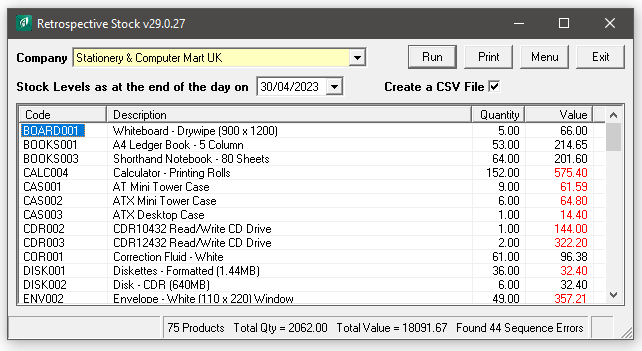
Do you need to run a Sage 50 Retrospective Stock Report? This program will calculate a stock valuation report as it was at a previous point in time. It is necessary because the Sage 50 Retrospective Stock report does not work after you have you have run the “Tools / Period End / Clear Stock” routine.
Unlike the Sage Report that just looks at the Cost Price field on the stock record, this Tool will scan through the Stock Transactions and use the correct cost prices for the product.
Core Features of Adept Sage 50 Retrospective Stock Add-On
- Calculates the stock levels at a specified date by working backwards from the current position.
- Values the stock at the specified date.
- Values the stock based on the Cost Prices of the actual incoming Stock Transactions.

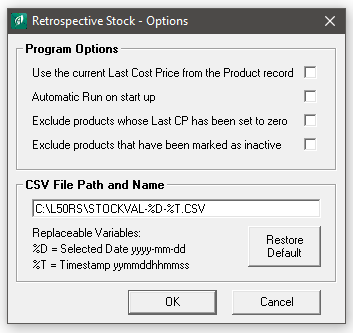
- Option to create a CSV File with variables for File naming.
- Option to Exclude Inactive or products with a Last Code Price of Zero.
- Option to Use the current Last Cost Price from the Product record.
- Option to Automatically Run on start up.
- Licensed for use on as many of your company’s computers as you like.
- You do not have to log other users out of Sage while using this Add-On Tool.
- The program can be run from an icon in the Sage Product module tool bar (dependant on Sage version).
Add-On Pricing and Compatibility
- Only £180.00 + VAT for a company wide licence plus 20% Annual Renewal Fees.
- Adept Add-Ons are Multi User at no extra cost.
- Compatible with the UK Edition of Sage 50 & 50cloud versions 8 to 34
- Unless otherwise stated, also works with any minor version numbers such as v32.1 or v33.1
- Adept Add-Ons are backwards compatible when it comes to Sage versions, most go back to v8
- Web Update facility to keep your program up to date, accessed via Menu>About.
- Thirty day Free Trial available.

Restrospective Stock in Action
Restrospective Stock Options
How much does it cost?

Initial Upfront cost Covering your first 12 Months software use
Adept Tools
Add-Ons & Apps for
Sage 50 Accounts

20% Annual Renewal Fee for Continuous use in Year 2 onwards
Customer Testimonials for Adept Tools & Support
Your Back to Back Ordering Tool is one we use numerous times a day, so thanks for the great software.

Thanks for the add-ons you created. I’ve used Sage for about 25 years and your input has been invaluable.
That explains it!!! Thank you so much I really appreciate it! Thanks & regards.
Thanks Danny, I am very impressed by the quick turnaround of my queries. Thanks & Regards.
Thanks for getting back, happy with your proposal, we have greatly appreciated your support over the past few years and would rather put the business your direction.
The instructions you gave worked perfectly, after giving normal users permission they can use ADEPT just fine, so many thanks for that.
I cannot sing the praises of Adept loudly enough!
Thank you, you’ve definitely proved your customer service is excellent!! 👍😆
Updating Sage correctly got rid of the problem. Sorry to bother you and thanks again for getting back to me so quickly. Always good to get such great customer service!
Most kind! Thanks, Danny.. Even on a Sunday(!)
Thank you again for your help on this, I was really stuck earlier. I understand the Sage RDA Service can be a temperamental beast. I was in awe of your keyboard skills too!

Thank you, this has solved my issue. First class service 😊
Great job btw Danny. Adept contact will not be forgotten!
Once again, Danny you have been terrific and a pleasure to work with. Thanks.
Thank you very much. It was lovely to see the tool picking up the new licence info without any intervention by us – if only all software was so user-friendly.
Many thanks for this update and assistance Danny with the Mess Subs Add-On.
Thanks a lot, Danny, as ever for such great service. If you ever have anyone wondering about using this add-on just tell them to phone me.
Thank you so much. Wonderful service as ever.
We have now moved away from Sage 50 (outgrown it!) but it was a great product and your service has been awesome.
A quick note to say thanks for this. We have successfully implemented your product using the Trial License versions supplied to us. Our customer is happy with the results and will be in contact over the next couple of months to purchase the products.
Many thanks Danny. You provide great support! All the best.
Thanks for your help. We have the new version and with a bit of a workaround it will now do what we need. That was great customer support. Regards.
Thanks for clarifying Danny. I appreciate the speedy resolution on renewing the Adept licences this morning.
This now works brilliantly thanks, I will be purchasing a licence shortly. Great support too Danny, cheers.
Thank you for our SOP template, it is working excellently here.
Thanks again for the fantastic support, please feel free to put that on your website. Kind regards.
Love the B2B tool BTW, Sage would be useless for us without it!
Great news! All seems to be working, thanks very much for all your help – high five!
Thank you very much – worked like a dream! Many thanks, I will definitely come to you next time I have a problem.
You were on the button. I removed all users. Adept was stuck in there plus one other user. After removing those and restarting Adept, it found the import file and imported it. Thanks for your top notch support.
I’ve got several of your Sage tools and think they are fab! Thank you.
Thank you for your help. I just unticked that box in the reporting tab and like magic, all the old reports reappeared! 😊
Many thanks Team, superb..!!
Just to let you know that we upgraded to Sage 50c Accounts Professional v25 yesterday. Although the Sage update was not eventless, the upgrade of our Adept Tools was straightforward. Thank you.
Thanks for sending Adept the lovely hamper, too kind! – Not at all – you help is much appreciated. We use your systems daily and they have been a great help to our business.
Thanks again for your help. And congratulations on creating some fantastic tools! Kind regards.
Thanks for the Stock Transaction editor upgrade. We have the Sage Line 50 Code Changer software too, Both bits of software have been absolutely invaluable over the years!
Thank you for explaining the versions and that we need Sage Standard and not the Pro she was trying to make to buy at gunpoint!
Other customers also purchased these tools


Adept Sage 50 CSV Import Tools for Sage 50 Accounts
For more reviews about the Adept Sage 50 Add-On Tools range
Visit the Sage Marketplace
