


Need a Sage 50 Data Repair? We provide an alternative to using Sage’s data repair service when your Sage 50 or 50cloud Accounts data has Errors or Invoice/Order Warnings.
Why use Adept to repair your Sage data errors?
- Over 2500 Sage 50 Data Sets successfully repaired.
- Thousands of satisfied customers from all over the world.
- Our lead repair technicians each have over 30 years experience with Sage 50 and its predecessors.
- Depending on availability, we can provide an overnight or weekend service.
What kind of Errors & Warnings can we repair ?
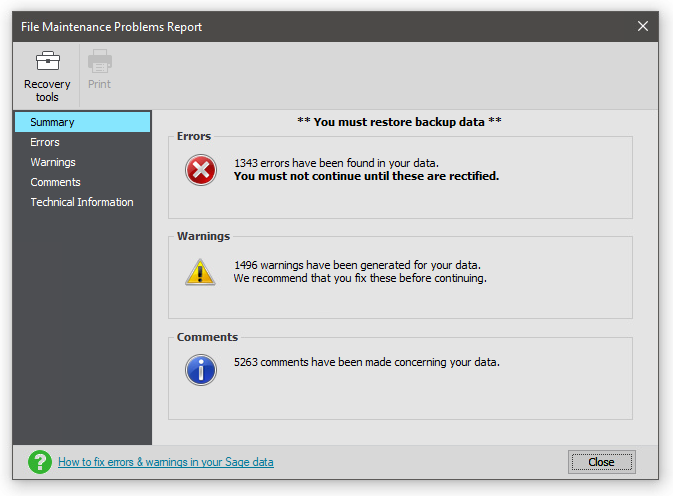
- Just about every kind of error that is reported by Sage’s Check Data routine.
- Obscure errors that are not reported by Check Data.
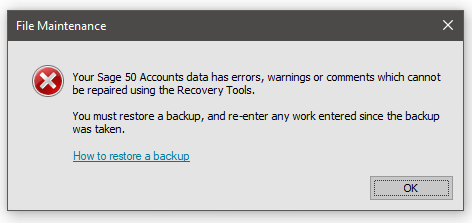
- The infamous “You must restore from a backup” error message.
- SOP, POP and Invoice module *Linkage Corruption* (reported as a Warning up to Sage v25).
- Errors that cause Check Data or other parts of Sage to hang.
- Stock Allocations and Quantities Used.
- Our good old friend Transaction 0.
- Aged Balance warnings.
- Many other types of error….


Common Sage Error Messages
- Trial balance based on transaction total is unbalanced by
- Trial balance recorded in nominal records is unbalanced by
- Split transaction is cross linked
- Split transaction is not linked to ledgers
- Header transaction is not linked to ledgers
- Total allocated is less/more than total allocated in stock files
- Transaction 0 has an invalid transaction type
- Amount paid in split disagrees with total paid in allocations
- Amount paid in foreign currency in split disagrees with total paid in allocations
- Transaction header record does not link to any splits
- Header transaction 0 is linked to wrong account
- Stock code quantity in stock disagrees with history by
- Stock code transaction quantity used is greater than quantity of transaction
- Account balance out by
- Split Allocation – amount disagrees with matching allocation
- Split transaction is mismatched with header transaction
- Amount paid in header disagrees with total paid in splits
- Invoice total net/tax different from sum of item net/tax values
- Invoice has a mismatched record
- Invoice has no items
- Purchase Order total on order is less than total on order in stock files
* What is Linkage Corruption? *
- This type of corruption results in the Item Lines for earlier SOs, POs or Invoices getting jumbled up every time a new SO, PO or Invoice is entered.
- In the Sage v26 and below Check Data routine reports this as a Warning but Sage v26.1 and above now report them correctly as Errors. The message you see is along the lines of “Invoice or Order 12345 total net different from sum of item net values” or similar.
- However, these Warnings/Errors can be caused by other types of corruption as well. Please do not attempt to delete the offending invoices or orders as this can make the corruption worse and unfortunately Sage seem to recommend this as option, but it just moves the corruption onto other invoices or orders.
- When Linkage Corruption is present, we can repair the integrity of the Invoice/SOP/POP Module files so that no new warnings or errors are reported.
- However, it is not possible to guarantee that all the historic Invoices, Sales Orders & Purchase Orders will have the correct items reattached to them.
- Once we have repaired the integrity of the module, you can remove and re-enter the Invoices, Sales Orders & Purchase Orders or simply mark them as BAD.
- Our Free Adept Sage 50 Health Check Tool has a Linkage Corruption Test that you can run from the Menu button.
Interested ?
Click Adept Data Repair T&Cs to find out how to proceed and book in your Sage 50 or 50cloud Accounts data. You can see comments below from lots of very happy customers!

Customer Testimonials
Thanks for sorting this out, great service! I have restored and getting no errors.

Just to say thankyou again for your hard work. You did a great job! Thankyou very much.
Thank you for your great work. It is great having you as our go to guy and your team of course.
Good morning Team, Thank you so much for your work on our data. Apologies for the delay in confirming receipt, we managed to upload this yesterday and ran a backup with no errors.
Hi Adept, thank you for the help and easy communication to make this happen.
So far so good, loaded and checked out ok. Well done, very good and fast service!
I’ve restored this and there are no error messages coming up now. Thank you for your help on this, much appreciated.
Thanks for your fast and efficient service. You may quote me!
Thank you very much Danny, I have successfully downloaded and restored the file. I will get all of that old data archived, thanks for all of your help!.
Thank You Danny!! We are up and running again!!
Can’t remember if I dropped you a line thanking you for the great service last week. Really appreciated you fitting that in.
I can confirm I have received the data, thank you for all your help once again.
Just a quick Email to say a big thank you to you and your team for sorting my Sage out for me and I would not hesitate in using or recommending your services to anyone. Thank you all.
We’ve got the data back and everything looks OK, thanks very much for your assistance it was much easier than dealing with Sage.
Just a follow up to say thank you again. The client has checked the data and are happy with the quality of the work.
Backup has been restored and all looks to be good. Thank you, your prompt resolution is greatly appreciated.
Thank you very much for getting this done so quickly.
Apologies, was not expecting you to be working on the bank holiday, thank you.
Thank you so much for getting this done. I really appreciate it! Have a lovely evening.
Brilliant service, thanks a lot. You guys obviously know your stuff as far as sage is concerned. Will definitely bear you in mind when we need anything Sage related in the future.
Thank you, thank you, thank you. You are the man or men! I wish I had done that on Wednesday last week when I discovered the issue instead of wasting many hours and the entire weekend on it. You live and learn. Cheers.
Once again, Thank you so much for your super fast data fix service.
Thanks again for the swift service, it has worked you are indeed life savers!
Hi Team. Thanks again for this, always a pleasure dealing with yourselves.
Thank you! Life savers!
Thanks, you are as normal a life saver and a genius ☺

Thanks for completing this so quickly!
Thanks Martin and Danny. That was not an easy fix! I think they had been carrying those errors for years until their accountant couldn’t make head nor tail of the accounts.
Thank you for sorting this so quickly!
Thank you very much! It is restored and they are now breathing again!
Once again, thanks for the speedy service sorting out our Year End. No doubt we’ll speak again next year.
Thank you for that. We are very impressed and will use Adept again.
I tried to call you a couple of times this morning to say thank you for your awesome service. I am very grateful as yet again you have managed to dig us out of a hole.
Great services as always, thankyou!
Many thanks from me and a delighted client.
It all works perfectly!! You are an absolute gem ? Fingers crossed we don’t bugger it up again!
Many thanks for dealing with this so speedily – you really do provide a most invaluable service.
Thanks a million Danny, so efficient as always.
Thanks Martin for doing this repair with zero notice!
Many thanks for a fantastic service. We have re-loaded the fixed data and are very relieved all has been fixed so efficiently. It was a pleasure to speak to Martin on Saturday and we would love to come back to Adept when we buy our next version of Sage.
I’ve restored the data and everything looks good. Thank you for your help. Its certainly appreciated.
Thank you so much for getting this to us before open of business, we really appreciate it, I’ve now restored the backup with zero errors.
Just to confirm, I’ve restored the data and ran check data again, all error free ?. Thanks for the brilliant assistance as ever!
Just a big thank you for your help with our Sage issue. Everything went quickly and smoothly and what a difference! We are hugely impressed by the Adept response, just wish we had contacted you sooner. All the best to you and the team. Have a great Christmas, you’ve made ours so much better 😊
Morning Danny, OMG !! Thank you so much! Email received.
Looks like you may have broken some kind of record there. Thanks for turning this around so quickly, we are set well in advance of tomorrow!
Great work recovering the Manager password, Excellent service.
Thanks for sorting this – now restored and all ok 😊
Thank you so much for sorting!
Thank you for sorting all this out for us. You have done a very impressive job! Thanks once again for your excellent service.
Many thanks for your help as always!
Many thanks for the fixed file. Much appreciated the quick turnaround.
Thank you for the two data repairs, the client is extremely grateful, they are a “people/contractor” based company and have a payment run to process today and tomorrow, this wouldn’t have been possible without your data repair.
Thank you, that’s awesome! Once again you’ve got us out out of the proverbial!
Thanks so much for a prompt response, this is greatly appreciated.
Thank you, that’s fantastic!
Thanks Danny The customer also sends over her thanks.
Thanks Danny, we have restored to the repaired data. Really appreciate your support!!
Thank you for fixing our data. I am going to upload it on Monday as I need to sort orders that came yesterday/today. Once again thank you for quick repair!
Thanks a mil to all at Adept!! Repair received and we are back in action!
Thank you so much for sorting this for us! I know it’s a paid service but that doesn’t mean we don’t really appreciate your time and efforts – you’ve never let us down and we recommend you to everyone.
Fab – thanks for turning that around so quickly. I have a happy customer, well as happy as he can be having had the riot act read to him about check data and regular backups!! Thanks again.
Thanks to you and your colleague for your support and patience today. It was really refreshing to talk to a company with such a ‘can do’ approach and we wish you all the very best for a successful 2023.
Thank you so much for the prompt repair of our Sage data.
Thank you, highly appreciated. We will be recommending you to all our clients.
Hi, thanks Danny for your a1 service yet again!
Downloaded, restored and checked. All good – thank you very much.
All received. Thank you so much for this, fantastic service as always! You’ve saved the day once again.
Thanks for your help in fixing the errors in our Sage data – we really appreciate your fast turnaround on this!
Yep I’ve got the link now, just putting the data back into Sage as we speak. Thanks so much for the quick turnaround, brilliant service.
Thanks a million, efficient service as usual.
Just restored Data and all OK, thanks for all your help, have a good one.
Thanks, great service as ever, much appreciated.
Thanks again for all your help with this, Sage has been much faster and more reliable!
Hello Danny, That’s great news. Thank you for doing it so quickly.
Thank you. Received the data back. Thanks for your help. Your company is a pleasure to deal with. Very efficient.
That’s great thanks for the quick turnaround.
Thank you Danny…. Superstar!
Thanks for your help and prompt service, appreciated as always.
Thank you Martin… yet another time you’ve saved us!
Thank you once again saving my poor clients ass
THANK YOU! Just wanted to say thank you for your help and support last week with the Data.
That is so fast, many thanks for fixing our data!
Thank you for the prompt repair of our data. We are good to go again!!
Thank you for your efforts as always, we don’t know what we’d do without the service you provide! I’ve loaded the backup and all looks good, fingers crossed we also see a performance increase too.
Thanks for that I have downloaded and checked the data and all looks good. Thanks for the quick turn around.
Excellent job as always. Thank you very much, Danny!
Got it Danny thanks a million. Client will be delighted with us and you. I do sing your praises to our customers!!
Thanks for your prompt service its very much appreciated. Thanks again Mike.
Hi Guys, Unbelievable, customer is very impressed, as are we. Thanks a million for such a great service.
Hi Guys. Thanks so much for this you truly saved our arses on this one!
Excellent. Thank you Danny. Brilliant service once again. Speak soon.
The data has been installed and the errors have gone! Thank you so much for helping us out today.
That’s fantastic work, thank you very much!
Hi Danny and Team. Many thanks again for your very fast service, it is much appreciated.
Thanks as ever for the brilliant service!
Thank you again for sorting the Sage issue yesterday.
Thank you, if you had not mentioned it we would have been none the wiser. And as usual, Awesome work, not sure what we would do without you!
